MJO · Connect guide · Gemini
How to connect an MCP server to Gemini
The Gemini app calls a remote MCP server a custom app, added under Connected Apps on gemini.google.com. Google's help page sets tight conditions on who can add one, so read "What you need" first.
For MCP Journey Optimization, Gemini is the client where eligibility is the first leak: a person outside the stated conditions cannot reach the Install stage at all. The comparison with every other client is in the field guide.
What you need
Google's help page "Connect custom apps" lists these conditions:
- Be 18 or over and in the US.
- A personal Google Account. Work or school accounts aren't supported "for now".
- History on: custom apps are unavailable when it is off.
- English only.
- An MCP server URL that follows the standard MCP specification, e.g. for the CrushedWithIt server,
<your server URL>. - A computer: you can only connect custom apps in the Gemini web app. Once connected, Google says they are also available in the mobile app.
Google's general Connected Apps page adds that availability varies by location, language, device and Gemini app.
Steps
- Go to gemini.google.com.
- At the bottom, click Settings, then Connected Apps. If you don't see it, click Personal Intelligence, then Connected Apps.
- Under "Custom apps", use the "Add a custom app link to get started" field, or click Add a custom app.
- Enter the app's MCP server URL.
- If the server doesn't support Dynamic Client Registration, click Show more next to "Advanced features" and enter the credentials the provider gave you.
- Click Next.
- Follow the on-screen instructions, including signing in on the provider's page.
Before connecting, Google says to make sure you trust the provider: it does not control, monitor or secure third-party MCP servers.
Use it in a chat
Type @ and select the app to make Gemini use it for that prompt. Google says Gemini asks for manual confirmation for write actions, though it can make mistakes.
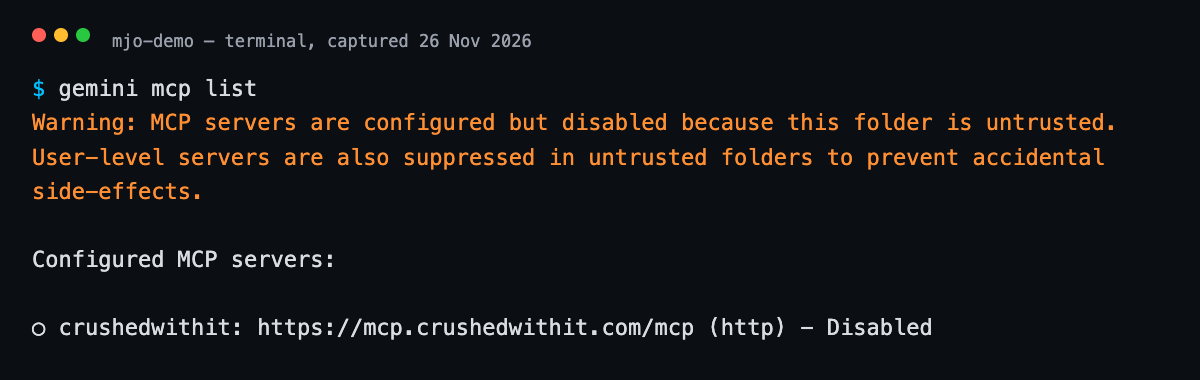
What it looks like (captured 26 Nov 2026)
The real status Gemini CLI reported for a server configured in a folder it did not yet trust.
Try it
Use something read-only first. For the CrushedWithIt server (used here as the example name):
@CrushedWithIt show my account and how many credits I can spend now.
For any other server: "@<app> list what you can do and run the simplest read-only action."
Common errors and fixes
| What you see | Fix | Basis |
|---|---|---|
| No "Custom apps" section | Check the conditions: 18+, US, personal account, English, History on, web app. | Google help page |
| Sign-in can't start | The server may not support Dynamic Client Registration. Use Show more next to "Advanced features" and enter the provider's client credentials. | Google help page |
| 401 or 403 errors (server builders) | Google's Developer Mode guide says to check token state and credentials in its Authentication tab. Developer Mode lives at Settings > Gemini Apps Developer Mode. | Google developer page |
| Error -32602 (server builders) | Invalid parameters: compare the generated arguments with the schema in Developer Mode's Tool Schemas tab. | Google developer page |
| App connected but unused | @mention it in the prompt. General: write tool descriptions the model can match to the request. | Google help page; general advice |
How to disconnect
- Turn off: Settings > Connected Apps, find the app under "Custom apps", turn it off, follow the instructions.
- Unlink and revoke permissions: click More details, then Disconnect. The app stays in your settings and can be relinked later.
- Remove: More details, then Remove app. Google says this also unlinks the MCP server from your Google Account.
- You can also unlink from your Google Account's Linked apps page.
What about Gemini CLI?
Gemini CLI has its own MCP configuration (gemini mcp add --transport http <name> <url>, stored in settings.json). Its documentation now carries a banner saying it "was replaced by Antigravity CLI on June 18th, 2026", so for Google's coding tools see the Antigravity guide.
Sources
- Google Gemini Help: Connect custom apps, checked 26 Nov 2026.
- Google Gemini Help: Connected Apps, checked 26 Nov 2026.
- Google developers: Gemini Apps Developer Mode, checked 26 Nov 2026.
- Gemini CLI: MCP servers, checked 26 Nov 2026.
Other clients: the MCP field guide compares all ten. The framework: MCP Journey Optimization (MJO).